Finger Indicator
The Finder Indicator ability will set an animator parameter which plays an animation depending on the state of the finger for each hand. This ability is designed for a first person perspective with two handed tracking headsets. The Finger Indicator ability will always be active and it will continuously update the Hand State Index and Hand Grip Strength Animator parameters. These parameters are unique VR parameters that are only on the VR hand Animators. If you are creating your own Animator Controller for your VR hands ensure you have added these parameters:
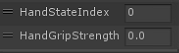
The following finger states map to the Hand State Index parameter values:
| Finger State | Hand State Index |
| Hand Resting, Thumb Resting, Index Resting | 000 |
| Hand Resting, Thumb Resting, Index Extended | 001 |
| Hand Resting, Thumb Resting, Index Contracted | 002 |
| Hand Resting, Thumb Extended, Index Resting | 010 |
| Hand Resting, Thumb Extended, Index Extended | 011 |
| Hand Resting, Thumb Extended, Index Contracted | 012 |
| Hand Contracted, Thumb Resting, Index Resting | 200 |
| Hand Contracted, Thumb Resting, Index Extended | 201 |
| Hand Contracted, Thumb Resting, Index Contracted | 202 |
| Hand Contracted, Thumb Extended, Index Resting | 210 |
| Hand Contracted, Thumb Extended, Index Extended | 211 |
| Hand Contracted, Thumb Extended, Index Contracted | 212 |
Setup
- Select the + button in the ability list under the “Abilities” foldout of the Ultimate Character Locomotion component.
- Add the “VR/Finger Indicator” ability. This ability should be positioned at the bottom of the ability list.
- Ensure your hand Animator Controllers contain the Hand State Index int parameter and the Hand Grip Strength float parameter.
Inspected Fields
Slot ID
The slot that should be used.
Prefix
The prefix of the event and input strings.
Inputs
Specifies the input mapping for all of the possible finger indicators.